




iStockphoto / george tsartsianidis / Cass Anderson / MacroFactor
So you have a few extra pounds on your frame you want to get rid of and aren’t sure where to begin? Maybe ‘dieting’ is something that you have only ever associated with cutting certain items out of your day-to-day, or taking what might be a traditional ‘healthy’ approach to eating? If any of this sounds familiar, you are not alone. I was in your shoes last year.
Growing up, I always took ‘dieting’ to mean eating a specific way for a specified period of time and seeing results along the way. Despite taking college-level nutrition and health classes years ago, nobody ever informed me that the reality of ‘dieting’ as it pertains to fat loss is simply getting into a caloric-deficit but doing it with the proper ‘macros’ so your body burns fat instead of muscle. We want to keep whatever muscles we have, right?
The 4 Pillars Of Losing Fat With MacroFactor

Cass Anderson / BroBible
Last year I was turned onto MacroFactor by a friend and the rest was history. I went on to lose nearly 50 pounds of fat, I’m in the best shape of my life at nearly 42-years-old, and this is all from someone who never thought that being really fit and ‘jacked’ was ever in the cards for me. I just assumed that was for the genetically-gifted people of the world. Lo and behold, all it took was adherence to what I see are the four main pillars of MacroFactor: Tracking, Weighing, Deficit, and Expenditure.
Download the MacroFactor App For iPhone or Android – use code ‘brobible’
First up: Tracking.
After downloading the MacroFactor App it asks you for some basic information such as your weight, the target weight you would like to reach, how many pounds you want to lose each week, and a few other questions. Then the app estimates your Total Daily Energy Expenditure (TDEE) based on your current weight.
From there, you begin tracking what you eat each day. From snacks to meals, everything in between. The more data you can feed the MacroFactor app the better because it can accurately measure your total daily caloric intake. With that information, combined with the next pillar (Weighing), it is incredibly accurate in measuring your average daily energy expenditure, or how many calories you burn each day on average. By doing this, the app can then recommend the daily calories and macros you should eat in order to be in a caloric deficit to lose fat at the rate you chose.
How easy is tracking with MacroFactor? I’m glad you asked!
MacroFactor’s app has a database with over 1.3 million foods. They have ran multiple tests against competitor apps and MacroFactor blows away the competition both in ease of use and the speed of the app / time it takes to log meal.
When it comes to actually logging items, there are several ways to input foods/snacks/recipes into the app:
— Type in the food manually and pull from the database
— Take a picture of your plate and MacroFactor’s AI analyzes everything on the plate to accurately predict the calories and macros
— Save all of your recipes within the app to easily pull them up under the recipes or favorites tab
— Barcode scanner for any food item that has a barcode on the box/container
— A ‘describe’ option where you simply type out what you are eating and the app predicts the caloriess
— ‘Quick Add’ for when you might know the macros but can’t pull up the exact item
— Inputting a recipe from a URL, you simply copy/paste into MacroFactor and it pulls up the macros/calories for everything from the recipe
Second pillar: weighing

Cass Anderson / BroBible
This one is straight-forward. Each morning you wake up, go pee, get on the scale, and then log your weight in the MacroFactor App. It doesn’t have to be at that specific time but the idea is you want to keep the same conditions day over day.
Ideally, you would not want to weigh yourself and log that weight after a workout since the conditions of a workout can change day to day. So first thing in the morning is best.
If you are not able to weigh yourself each and every day, that’s totally fine. MacroFactor can use 1 weight measurement a week to measure your progress but as I mentioned before, the more data you feed the app the better.
Download the MacroFactor App For iPhone or Android – use code ‘brobible’
Third pillar: (Caloric) Deficit
Now that you are tracking what you are eating and logging your weight each day, the app uses its algorithm to measure your total daily energy expenditure (TDEE). This is different form your Basal Metabolic Rate which is the total calories your body burns each day if you did nothing at all and simply sat in bed.
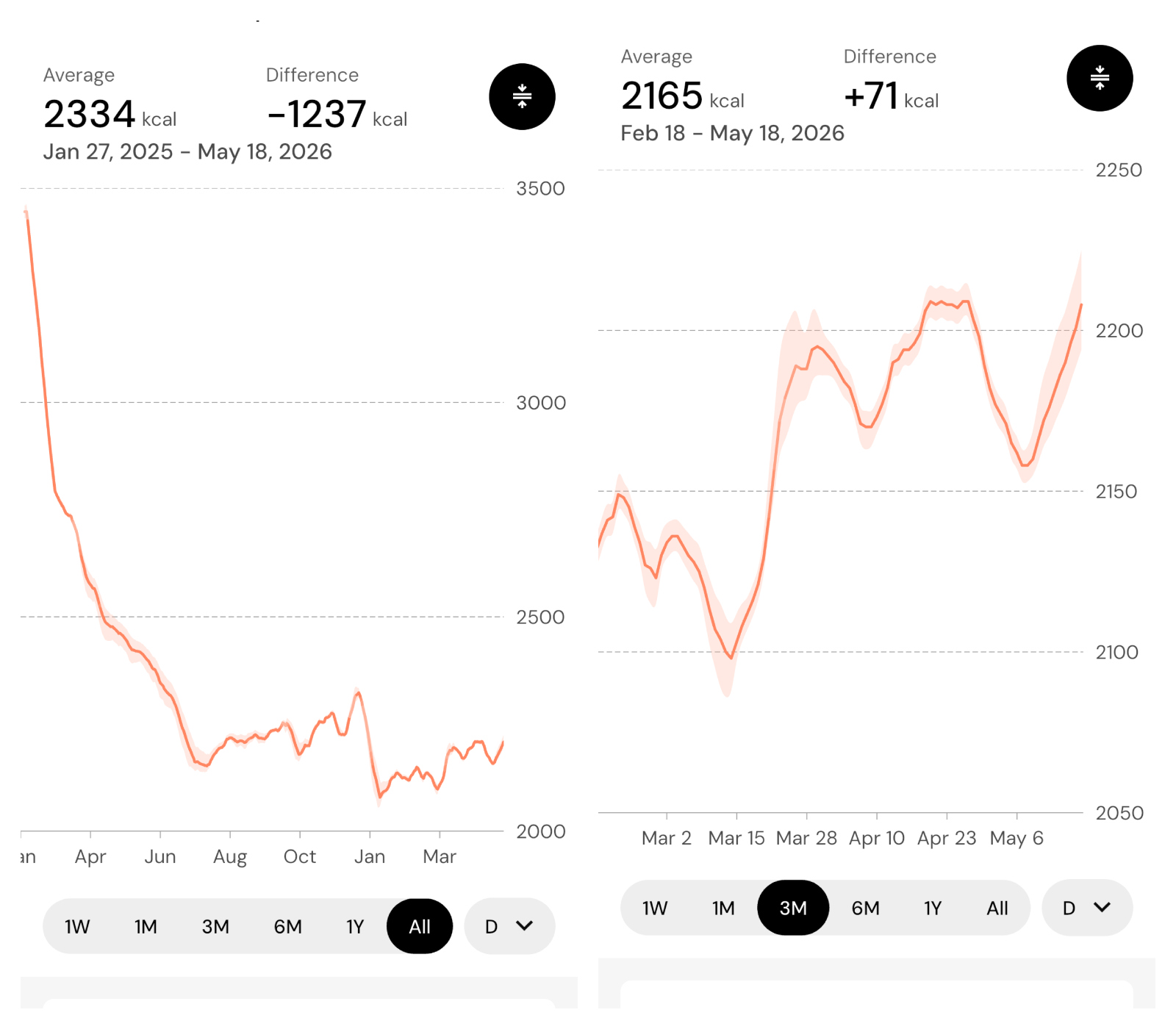
The TDEE measurement takes into account all of the calories you burn each day, from exercise and movement, muscle vs fat, and it is variable over time. MacroFactor is constantly updating your TDEE. Below is my TDEE, from the time I first started using MacroFactor (on the left) to the last month (on the right). My TDEE has spiked in the past month after I’ve come back from a lower back injury. I have also been in a cut in the past few weeks:
Cass Anderson / BroBible
Each Monday, you ‘check in’ with the app and it makes adjustments to your goal. This morning the app upped my daily caloric intake recommendations by 49 calories despite still being in a cut for another pound of fat. For me this was incredibly welcome news!
By getting myself into a caloric deficit each day, but also hitting my recommended ‘macros’ which are recommended grams of Protein, Carbohydrates, and Fat, I am able to lose fat and not muscle. This is crucial as I’m currently training for a 70.3 IronMan and signed up for the Tampa Hyrox later this year. I worked hard for my muscle and I want to keep it.
Download the MacroFactor App For iPhone or Android – use code ‘brobible’
Last But Not Least: Expenditure

Cass Anderson / BroBible
We have talked a lot about expenditure above but it is still very misunderstood by many people going through the fat-loss journey for the first time. Someone explained it to me a long time ago in a visual way that I still find helps most people conceptualize what is happening.
Imagine all of the fat on your body as a weighted vest. As you lose fat each week, weight comes off of that vest and your body does not have to work as hard. Thus, the total daily energy expenditure goes down.
But if you are going through body recomposition you are gaining muscle while losing fat. And that’s great! 1 pound of muscle burns 6-10 kcals at rest versus 1 pound of fat burning 2-3 kcals, which means you can also eat more calories each day and remain at a steady weight when you have more muscle than fat.
Even still, that total daily energy expenditure number will continue to drop as you lose weight. The only ways to get it back up are by gaining/building muscle and working out more.
Most people, myself included, vastly overestimate how many calories we burn during exercise but MacroFactor takes out all of the guesswork because when you are tracking calories in each day and your weight each morning the app can accurately predict your TDEE. And that’s how we’ve come to the end! Results.
Download the MacroFactor App For iPhone or Android – use code ‘brobible’
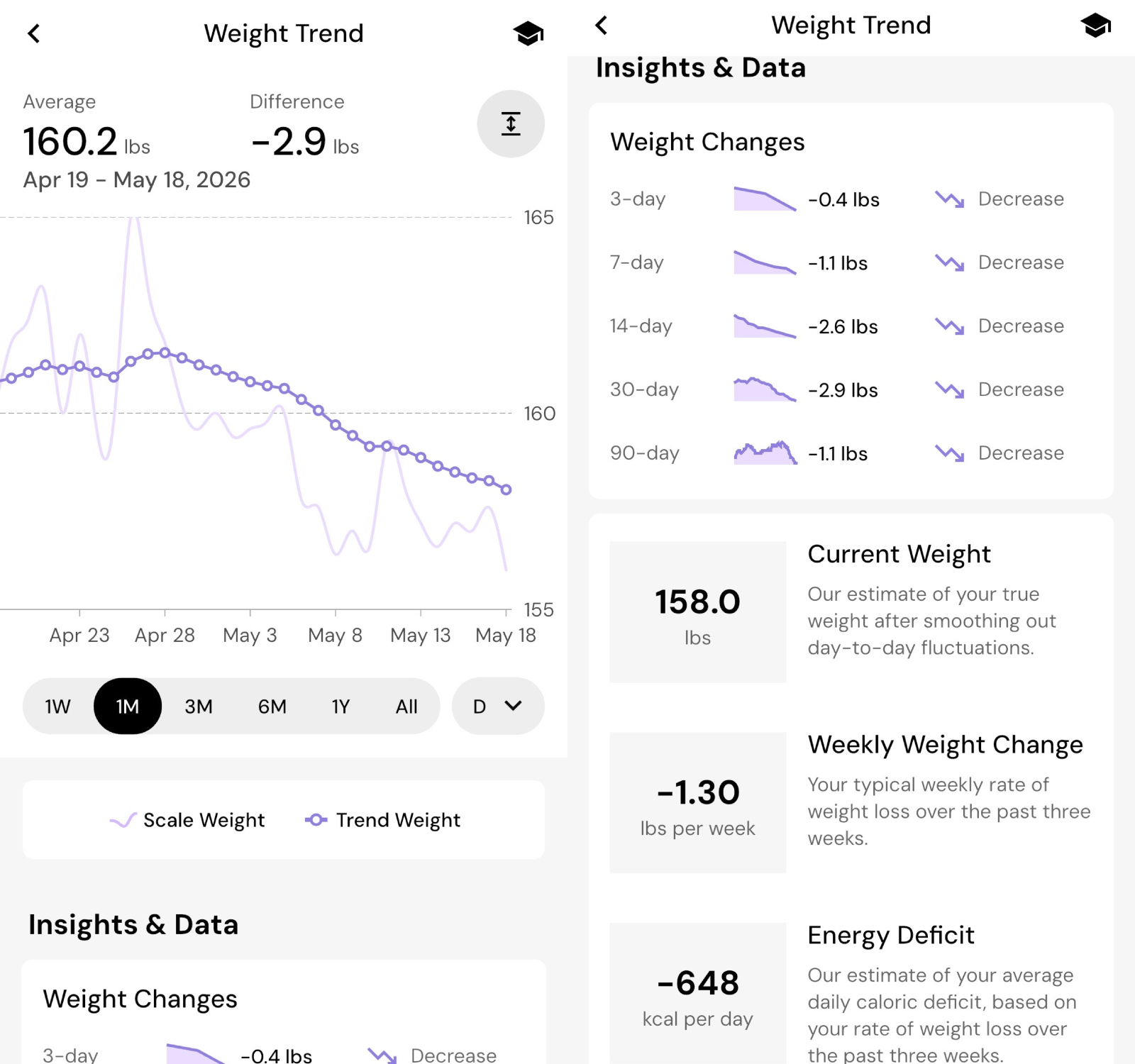
After gaining some weight throughout the holidays and into the new year… Not much, maybe 5 or 6 pounds, I went back into a cut recently and the fat has been flying off. Here is what the past month has looked like for me by adhering to what I call the four pillars of MacroFactor success:
Cass Anderson / BroBible
Ready to get started for yourself? We’ve got you covered! You can download the MacroFactor Workouts app by following any of the links throughout this article. Using the promo code ‘BROBIBLE‘ you will receive a 2-week free trial. That is ample time to know whether or not this will be for you.
I use this app every day. I swear by it. And I would not recommend this to you all if it wasn’t something I believed in.